在808DA數控系統上不斷電升級image
2020-08-26 07:46:55陳剛羌鈴鈴
電腦知識與技術
2020年20期
陳剛 羌鈴鈴

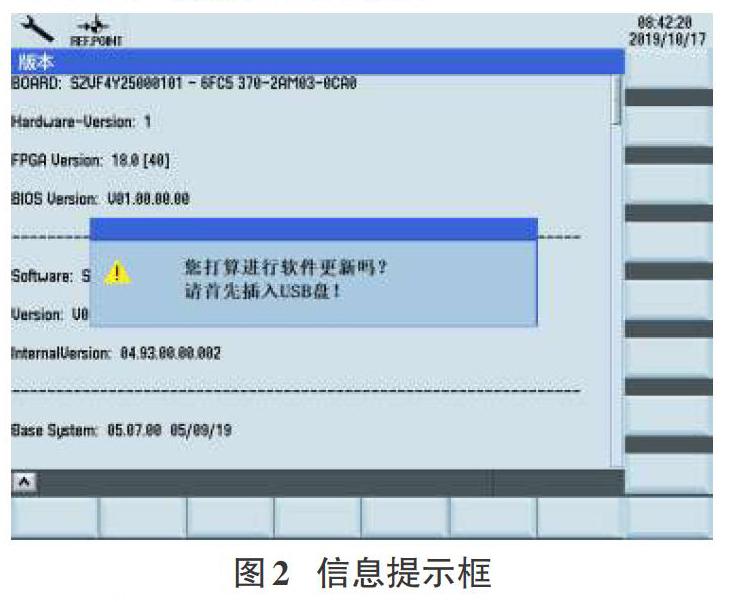
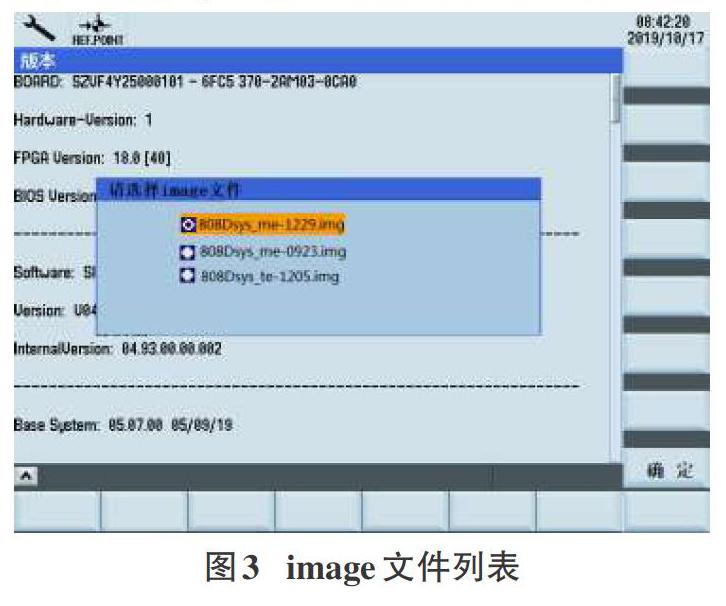
摘要:西門子數控系統SINUMERIK 808D Advanced產品在市場得到了廣泛的應用。針對每次更新升級image時都需要對數控系統斷電從而導致用戶操作不方便的現象,提出了一種新的不斷電的升級方式。詳細地討論了新的升級方式的操作步驟。在帶電的情況下插入USB盤,讀取其中的image文件并將其解壓、mount到Linux操作系統中。與以往的升級方式比較,新的升級方式能夠保持帶電狀態下更新、激活image文件,同時在文件解壓操作上也有了新的改進。采用新的升級方式,不再需要兩次斷電,給用戶操作808DA數控系統帶來很大的便利。
關鍵詞:808DA;image文件;斷電升級;mount技術;帶電升級;HMI
中圖分類號:TP311 文獻標識碼:A
文章編號:1009-3044(2020)20-0204-03
Upgrade Image of Uninterrupted Power Supply on 808DA Numeric Control System
CHEN Gang1, QIANG Ling-ling2
(1.Nan Jing MoDi Multiple Dimensional Digital Limited Company, Nanjing 210034, China; 2.Jiangsu Province SuCe informationtechnology Co.,LTD.,Nanjing 210013. China)
Abstract: Siemens "SINUMERIK 808D Advanced" Numeric Control system product has got widely used in market. Due to the phe-nomenon that updating image every time to power off Numeric Control system leads to some inconvenience for user's operation, theauthor provides one novel means of upgrade image with uninterrupted power supply. The operation steps of the new upgrade are dis-cussed in detail. Please insert the USB stick when 808DA controller is in power. The Numeric Control system will read the imagefile which is designated by user and unpack it, then mount it into linux operation system. Compared with other old upgrade means,the new upgrade method can let 808DA image file be updated and be activated in power. In addition. there are some newly improve-ment for uncompressing image file. Using the newly upgrade means, customer needn't power off two times any more. These modifi-cations will bring great convenience for customer to operate 808DA Numeric Control system.
Key words: 808DA; image file; upgrade; with power off; mount technique; upgrade in power; HMI
1引言
伴隨著現代化機械T業的快速發展,西門子SINUMERIK808D AdvanCed數控系統[1](簡稱808DA NC)有很廣泛地應用。客戶可以使用它來生產汽車或飛機上零部件。為了滿足客戶的需求,我們為SINUMERIK 808D AdvanCed數控系統開發了一些新功能。而且有時客戶也會反饋一些PR缺陷問題,我們需要為客戶解決這些問題。
如果我們為系統集成了新功能或者解決了軟件的一些bug,我們需要升級更新的image文件進入808DA NC數控系統。但是目前使用的更新image方法需要多次斷電,這樣很煩瑣和不方便。
2目前系統升級是怎么實現的?
目前為止,如果我們想更新image到808DA NC數控機床[2,5],我們使用的是下列的操作步驟。
1)首先,我們插入USB盤進入808DA NC數控機床[6]的PPU操作面板上。然后我們按下斷電按鈕讓系統斷電,再按一下這個按鈕讓系統上電。
2)第二步,我們將重新上電808DA NC系統,讓NC系統重啟。……
登錄APP查看全文
猜你喜歡
兒童故事畫報·發現號趣味百科(2025年8期)2025-08-23 00:00:00
中學生天地(A版)(2022年10期)2022-11-23 06:42:50
工業設計(2022年8期)2022-09-09 07:43:20
軍民兩用技術與產品(2021年10期)2021-03-16 06:05:30
北京測繪(2020年12期)2020-12-29 01:33:58
家庭影院技術(2017年9期)2017-09-26 03:41:45
商用汽車(2016年11期)2016-12-19 01:20:16
商用汽車(2016年6期)2016-06-29 09:18:54
商用汽車(2016年4期)2016-05-09 01:23:12
商業評論(2014年9期)2015-02-28 04:32:41