RHEL7 Network Teaming(網卡綁定)配置與測試
2014-03-13 07:41:21龍君芳
電腦與電信 2014年9期
關鍵詞:物理
龍君芳
RHEL7 Network Teaming(網卡綁定)配置與測試
龍君芳
(廣東技術師范學院天河學院,廣東 廣州 510540)
本文重點介紹Network Teaming的兩種模式(輪循與主備)的原理與配置。本文采用命令行設置與修改配置文件兩種不同的方法對Network Teaming進行配置,其中用命令行的方式配置了輪循模式,用修改配置文件的方式來配置主備模式。
Network Teaming;輪循;主備
1.引言
現在的服務器至少都有兩個網卡,如何同時充分利用這兩張網卡,RHEL7推出了它的應用Network Teaming。Network Teaming是將多個網卡綁定在一起,在邏輯上來講就相當于一個網卡,它可以提高網絡的容錯與吞吐量。在RHEL7中使用的是Teaming技術,而在RHEL6使用的是Bonding技術。Teaming是一項新的實現技術,不影響老的Bonding技術的應用。配置Teaming有兩種方式,第一種是使用nmcli命令,第二種是直接修改配置文件。
2.配置方法及測試
Teaming模式有 broadcast、roundrobin、activebackup、loadbalance、lacp幾種,下面介紹最常用的兩種模式。
2.1 roundrobin模式
roundrobin模式也稱為輪循模式,它是基于每一個包的,當某一臺服務器的兩個網卡設置為roundrobin模式的Teaming,此時服務器發出的數據包,就會在兩個物理網卡上進行輪循,即第一個數據包走第一個網卡,第二個數據包走第二個網卡,第三個數據包走第一個網卡,第四個數據包走第二個網卡,依此輪循。這種模式需要交換機的支持,必須要在交換機上做以太通道。拓撲設計圖如1所示:
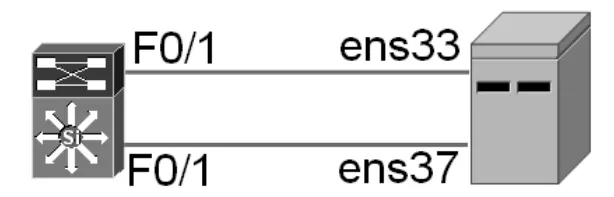
圖1 roundrobin模式拓撲設計圖
該模式配置步驟如下:
(1)服務器上的配置
步驟1:查看網卡
[root@localhost~]#ip addr
通過上面的命令,發現有兩個網卡,ens33與ens37
步驟2:創建team接口team0,同時設置teaming模式為roundrobin
[root@localhost~]#nmcli connection add type team con-name team0 ifnameteam0 config '{"runner":{"name":"roundrobin"}}'
步驟3:給接口team0設置IP地址
[root@localhost~]#nmcli connection modify team0 ipv4.addresses 192.168.1.1/24
[root@localhost~]#nmcli connection modify team0 ipv4.method manual
步驟4:把物理接口加入到team0
[root@localhost~]#nmcli connection add type team-slave conname team0-port1 ifname ens33 master team0
[root@localhost~]#nmcli connection add type team-slave conname team0-port2 ifname ens37 master team0
(2)查看team0狀態
可以看出,teaming的模式為roundrobin,同時有兩個物理接口,分別是ens33與ens37,都是up的狀態。
[root@localhost~]#teamdctl team0 state
setup:
runner:roundrobin
ports:
ens33
link watches:
link summary:up
instance[link_watch_0]:
name:ethtool
link:up
ens37
link watches:
link summary:up
instance[link_watch_0]:
name:ethtool
link:up
(3)交換機上配置以太通道,可以參考交換機的配置手冊
(4)測試
從兩方面進行測試,首先測試禁用其中某一塊網卡,別一塊網卡會不會照常工作,測試如下:
在一臺windows主機上ping服務器的時候,加上-t參數,也就是說一直ping下去,然后在服務器上禁用某一個網卡,執行命令:
[root@localhost network-scripts]#nmcli device disconnect ens33,
查看在windows主機上還是能ping通服務器的。
測試的另一方面是看它們之間有沒有輪循,可以采用抓包的方式,比如ping四個包,如果第一塊網卡上面有兩個請求包,第二塊網卡上有兩個請求包,就說明它們之間有輪循。
2.2 activebackup模式
activebackup是主備模式,不需要交換機的支持,當網卡綁定成這種模式之后,此時一個物理網卡的狀態是主的,一個物理網卡的狀態是備的,平時是利用主的網卡傳輸數據包,當主網卡失效之后,備用的網卡就會接管主網卡,進行工作。
拓撲同上,配置步驟如下:
(1)服務器上的配置
步驟1:配置team0的配置文件
[root@localhost~]#cd/etc/sysconfig/network-scripts
[root@localhost network-scripts]#cat ifcfg-team0
DEVICE=team0
TEAМ_CONFIG="{"runner":{"name":"activebackup"}}"
DEVICETYPE=Team
BOOTPROTO=none
NAМE=team0
ONBOOT=yes
IPADDR0=192.168.1.1
PREFIX0=24
步驟2:配置team0-port1與team0-port2
[root@localhost network-scripts]#cat ifcfg-team0-port1
NAМE=team0-port1
DEVICE=ens33
ONBOOT=yes
TEAМ_МASTER=team0
DEVICETYPE=TeamPort
[root@localhost network-scripts]#
[root@localhost network-scripts]#cat ifcfg-team0-port2
NAМE=team0-port2
DEVICE=ens37
ONBOOT=yes
TEAМ_МASTER=team0
DEVICETYPE=TeamPort
步驟3:啟動team0
[root@localhost network-scripts]#systemctl restart network
(2)查看teaming
[root@localhost network-scripts]#teamdctl team0 state
setup:
runner:activebackup
ports:
ens33
link:up
ens37
link:up
runner:
active port:ens33
(3)測試
1)可以在另外一臺主機來ping此臺服務器,當禁用主網卡ens33的時候,另一個備用網卡ens37就會接管工作。
[root@localhost network-scripts]#nmcli device disconnect ens33
[root@localhost network-scripts]#teamdctl team0 state
<輸出省略>
active port:ens37
2)啟用網卡ens33,為了高可用性,ens37還處于active狀態。
[root@localhost network-scripts]#nmcli connection up team0-port1
[root@localhost network-scripts]#teamdctl team0 state
<輸出省略>
active port:ens37
3.總結
RHEL7的網卡綁定技術,不僅可以實現冗余,還可以提高網絡的吞吐量。而且還有多種模式可以選擇,有效地利用了兩塊網卡。
[1]Otto.接觸Linux RedHat7.3[N].電腦報,2012-07-29.
[2]黃秀麗.基于嵌入式Linux的實時性改進的研究與應用[J].遼寧師專學報(自然科學版),2005,(02).
The Configuration and Test of RHEL7 Network Teaming(network card binding)
Long Junfang
(Tianhe College of Guangdong Polytechnic Normal University,Guangzhou 510540,Guangdong)
tract】 This paper focuses on the principle and configuration of two modes of Network Teaming(roundrobin and activebackup).It uses the command line setup and configuration files modification to configure the Network Teaming.The command line setup is used for roundrobin,while the configuration file modification is used for activebackup.
words】 network teaming;roundrobin;activebackup
龍君芳,女,湖南衡陽人,學士,講師,研究方向:計算機科學與技術。
猜你喜歡
中學生數理化·八年級物理人教版(2023年11期)2023-12-26 07:50:02
井岡教育(2022年2期)2022-10-14 03:11:44
中學生數理化(高中版.高考理化)(2022年5期)2022-06-01 06:27:46
中學生數理化(高中版.高考理化)(2022年1期)2022-04-26 13:53:42
中學生數理化(高中版.高考理化)(2022年3期)2022-04-26 13:41:26
中學生數理化(高中版.高考理化)(2022年3期)2022-04-26 13:41:24
課堂內外(初中版)(2022年2期)2022-02-28 02:00:30
云南教育·中學教師(2020年9期)2020-11-16 00:27:58
中學生數理化·八年級物理人教版(2019年9期)2019-11-25 07:33:00
中學生數理化·八年級物理人教版(2017年9期)2017-12-20 08:11:28