
WPF中應用行為實現對媒體的控制
2021-02-28 11:53:54霍曉鋼
電腦知識與技術
2021年35期
關鍵詞:數字媒體
霍曉鋼



摘要: 為了解決沒有編程基礎的數字媒體開發人員,對數字媒體的控制需求,WPF開發工具Expression Blend引入行為(behavior)編程包直接作用于控件,使得只需修改對應屬性參數就可方便對數字媒體對象加以有效地控制。本文介紹WPF行為的應用,展示不用編程完成應用程序中對數字媒體控制的設計與制作過程。
關鍵詞:WPF;行為;數字媒體;編程
中圖分類號:TP311 ? ? ?文獻標識碼:A
文章編號:1009-3044(2021)35-0102-03
Application Behavior in WPF to Control Media
HUO Xiao-gang
(Zhejiang Technical Institute of Economics,Hangzhou 310006,China)
Abstract: In order to solve the control requirements of digital media developers without programming foundation, WPF development tool expression blend introduces behavior programming package to directly act on the control, which makes it easy to control digital media objects effectively by modifying the corresponding attribute parameters. This paper introduces the application of WPF behavior, and shows the design and production process of digital media control without programming.
Key words : WPF;behavior;digital media;computer coding
WPF(Windows Presentation Foundation,直譯為:窗口展示平臺)是微軟新一代矢量圖形系統,WPF有著靈活、易擴展的動畫機制,接口設計非常直觀,能方便地進行可視化編輯[1]。也能夠方便快捷地制作精美復雜的UI(用戶界面設計)并無須大量的程序代碼的設計。
微軟開發了Expression Studio套裝工具可視化的設計界面中的Expression Blend,自Visual Studio2013以后全部集成安裝在開發系統中。所寫的目標代碼適用于微軟支持的所有平臺,在Expression Blend中,通過美工板上繪制形狀、路徑和控件,然后修改其外觀、動畫和行為,能夠直觀地設計應用程序。也可以通過導入圖像、視頻和聲音,只需修改其屬性就可以對項目對象進行有效地控件,大大方便沒有程序設計基礎的制作人員。本文通過介紹Expression Blend中行為的應用,展示不用編寫程序代碼或較少地編寫程序代碼,對數字媒體控制的方法。
1 Blend行為的設置
1.1 Expression Blend內置行為
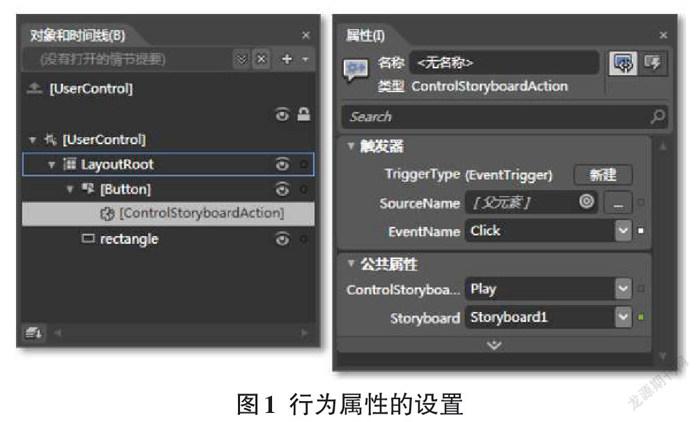
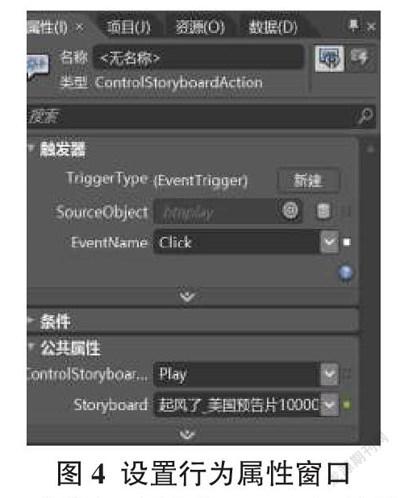
Expression Blend中的“行為”是一些可重用的封裝代碼段,將這些代碼段拖動到控件對象上后,僅通過更改其行為屬性進行微調,不需要編寫任何代碼[2],就可向應用程序添加交互、動畫等功能,設計出所需的應用程序響應的方式[3]。……
登錄APP查看全文
猜你喜歡
東方教育(2016年21期)2017-01-17 21:03:22
中國新通信(2016年22期)2017-01-13 09:39:34
東方教育(2016年13期)2017-01-12 21:04:46
藝術科技(2016年10期)2016-12-14 20:56:24
新媒體研究(2016年20期)2016-12-02 19:55:25
商(2016年32期)2016-11-24 17:49:33
藝術科技(2016年9期)2016-11-18 15:23:43
藝術科技(2016年9期)2016-11-18 15:05:07
人間(2016年26期)2016-11-03 18:20:09
成才之路(2016年25期)2016-10-08 10:00:36
